 SafeTour
360 virtual industrial tour for training and Site Induction
Introducing new employees to an industrial site in person takes time and can involve safety or operational restrictions. SafeTour, developed by YSafe within the YMOND ecosystem, addresses this need. It lets instructors introduce routes, sensitive areas, and equipment through guided 360° tours that can be repeated for groups.

- Specialized department
- YSafe
- Scope of application
- Mining, steel, manufacturing, and industry
What exactly does this solution solve?
This solution is intended for HSE, employee onboarding, and industrial site operations teams. It is suited to site induction, introductions to operating units and safe routes, and group training for new employees. Implementation is tailored to each client's goals and operating conditions.
Start with the real problem: what does the end user need to do, which steps are difficult, what information or equipment is available, and how will success be measured? It lets instructors introduce routes, sensitive areas, and equipment through guided 360° tours that can be repeated for groups. Defining these needs guides feature design and helps avoid unnecessary development costs.
Initial face-to-face exposure to high-risk sites is difficult, costly, and not the same for all groups. SafeTour allows you to review important points and safe routes with shared video content and instructor guidance before entering the field
Applications and use cases
- Introduce new employees to the site before they enter operating units
- Group training on safe routes and equipment location
- Instructor's explanation of selected points or equipment
- Repeat familiarization for contractors and subsequent groups
Key capabilities and components
- Panoramic coverage of key points, simultaneous group tour, coach guidance, virtual laser pointer and route/equipment display. Content configuration for each site is done according to the order
Core features, modules, and custom options are agreed during each project's needs assessment. The capabilities listed here describe the possible scope; they are not all necessarily included in a single package.
How the solution is experienced or implemented
Selected points of the site are taken in the form of 360-degree panoramic images and are prepared for viewing
The trainer starts the session and selects the desired point
Group sees the same spot
Technology, requirements and project output
Technology and technical requirements
- 360 degree panoramic images and virtual pointer in group experience. Presentation for PC and VR headset will be considered based on project requirements
- The name of the headsets, minimum computer specifications, software engine, browser and operating system versions are specified in the technical sheet of the project.
Customization and deliverables
- Configurable by site and scope of order: panoramic points, visit route, equipment description, HSE priorities and instructor content. The number of points, language, update method and any organizational connection must be specified in the project definition
- Configured supply per site
- The user's platforms of choice are PC and VR. Deliverables can include panoramic site content and a guided tour experience
Before starting, define the business or operational goal, an example scenario, budget and timing constraints, deployment environment, and technical decision-maker. These details help establish a realistic scope and delivery criteria.
Who is this solution for?
Purchasing and implementation may involve technical, training, product, marketing, or operations teams, depending on the intended use. It is suited to site induction, introductions to operating units and safe routes, and group training for new employees. If the problem or access to the necessary data and content is unclear, start with a needs assessment or pilot.
Product image gallery
2 image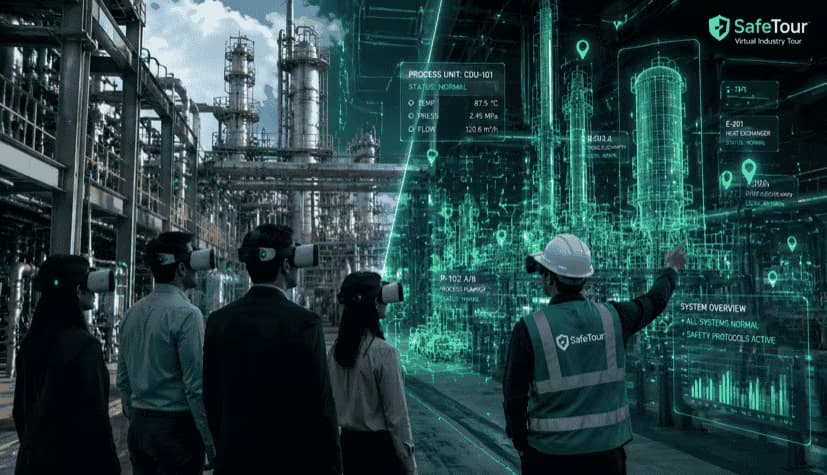
Related experience and projects
- 360 degree industrial tour of Aria Sasol polymer; Group training with instructor guidance
How to assess the solution's quality
Before purchasing or developing this solution, agree on the following three acceptance criteria in the technical review, alongside the required features:
- Compliance of the scenario with the client's operational or training instructions
- Correct action sequences and trainee assessment criteria
- Interactive testing on headset and instructor or HSE unit approval
Frequently asked questions
What is the difference between a 360 industrial tour and a video?
In the industrial virtual tour, the user can visit different parts of the site and receive an explanation related to the environment; Linear video has a pre-fixed viewing path
Can a trainer lead group training?
Yes; The instructor can guide the group's simultaneous visit and point to sensitive equipment, routes or sections with a virtual pointer.
How are the sensitive points of the site marked?
Key points of visit can be organized with a guide and text or audio information; Scope and implementation details should be coordinated with the organization
Can the initial visit be done without entering the premises?
SafeTour aims to reduce the need for initial visits in operational environments; Physical attendance requirements, permits, and field training remain the responsibility of the client's protocol
Why choose YMOND for this solution?
YMOND is a deep tech development group working across AI, computer vision, immersive XR experiences, and interactive hardware. YSafe is the specialist team behind this solution. Together, these capabilities allow the project team to address each client's challenge through coordinated software, content, and hardware design where needed.
Complementary solutions
How can I request a demo or a tailored proposal?
To explore an industrial virtual tour for your organization, share your challenge, audience, operating environment, and expected outcomes with the YMOND team. Request a specialist consultation or start with the Vision Plus needs assessment to assess feasibility, discuss customization, and receive a technical proposal.
